Tell
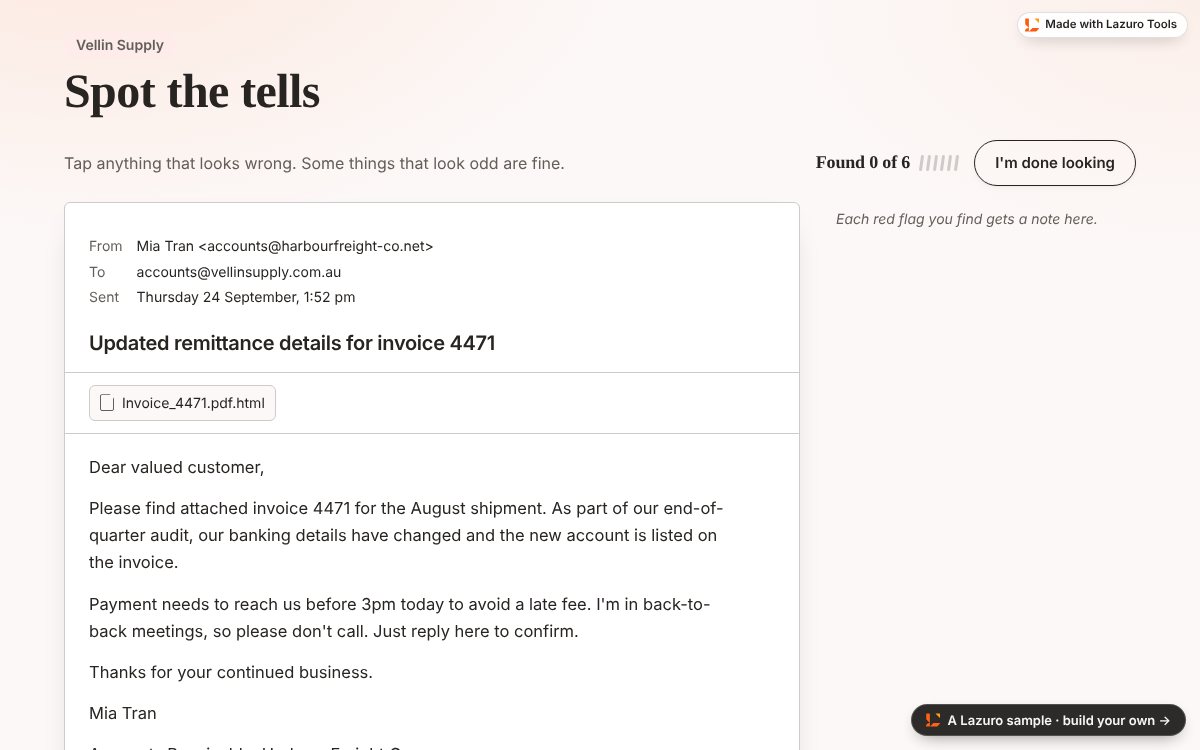
A realistic email, chat or document with the warning signs left in. The learner taps whatever looks wrong. Each red flag they find is circled in red ink and explained; the decoys, things that look odd but are fine, say why they're fine. When they're done looking, anything they missed is drawn in with its note. It's how people learn to notice: by noticing, then seeing what they walked past.
The sample, exactly as it came back
An invoice email from a supplier the learner deals with every week. Six things are wrong with it, and two things that look wrong aren't. It's a free build, so it carries the small Lazuro mark.
Suspicious versus merely unusual
The artefact is the learner's real world: the supplier email, the Teams message, the policy page. The red flags are marked in the text itself, so the page knows exactly which words carry each one. Decoys matter as much as flags: they turn spotting into judging. The closing card gives the one rule to remember, and the score is flags found out of flags.
Email, chat or document
An email with its header and attachments, a chat thread with both sides, or a document page. Under 250 words reads best.
Notes that teach
Every flag carries a why in the learner's world: what would have happened next if they'd missed it. Every decoy says why it's fine.
Scored for the LMS
The page reports flags found out of flags, so a SCORM package records it. It works with touch and the keyboard as well as a mouse.
Ask your AI. Lazuro checks what it writes.
Tell has no form to fill in yet: you describe what you need to your AI app and it builds through Lazuro Tools. Lazuro reads its guide first, checks the result against the same rules the page uses, and sends back a link, the file and a SCORM package. Phishing, invoice fraud, scams, safety walk-throughs and compliance checks all suit it.
Try this message
Build a Tell activity for our accounts team: a supplier invoice email with five red flags of invoice fraud (a lookalike domain, changed bank details, a deadline, a request not to call, a disguised attachment) and two decoys. Our supplier is Harbour Freight.
Not connected yet?
It takes about a minute: add Lazuro Tools as a custom connector, sign in, and ask.
Free to build. A plan takes the mark off.
Free builds come back with a hosted link for 30 days, the file and a SCORM package, with a small Lazuro mark. A Lazuro Tools plan removes the mark, keeps builds hosted for a year and stamps them to your licence. One plan, one account, every builder.
Free
Ask your AI: a hosted link for 30 days, the file and a SCORM package, with a small Lazuro mark, up to 20 builds a day.
Lazuro Tools · $29 a month
No mark, builds hosted for a year, up to 200 builds a day, and everything the plan adds in the browser builders. Cancel any time.
Lazuro Tools · $290 a year
The same, two months cheaper. Prices in AUD, GST added where it applies; invoices available for organisations.
Free during the preview. Make an account before 1 January and the full plan is yours until 1 January 2027, no card needed. Sign in to claim it.
Want it written and built for you, with your own material? That's a service.
Six red flags. Two decoys. One rule.
A spot-the-red-flags activity your AI writes and Lazuro checks.
Build one from your AI