Lantern
A deck that presents itself. Pick a theme, pick a layout for each slide, type the words, and Lantern does the rest: headings rise, lists build a line at a time, numbers count up, charts draw themselves. Fifty layouts, from a title and an agenda to an icebreaker spinner, a staged timer, flip cards and a knowledge check that scores. Another Lazuro build sits in a slide as an embed. It presents from any browser and leaves the builder as one file, or a PDF or PowerPoint.
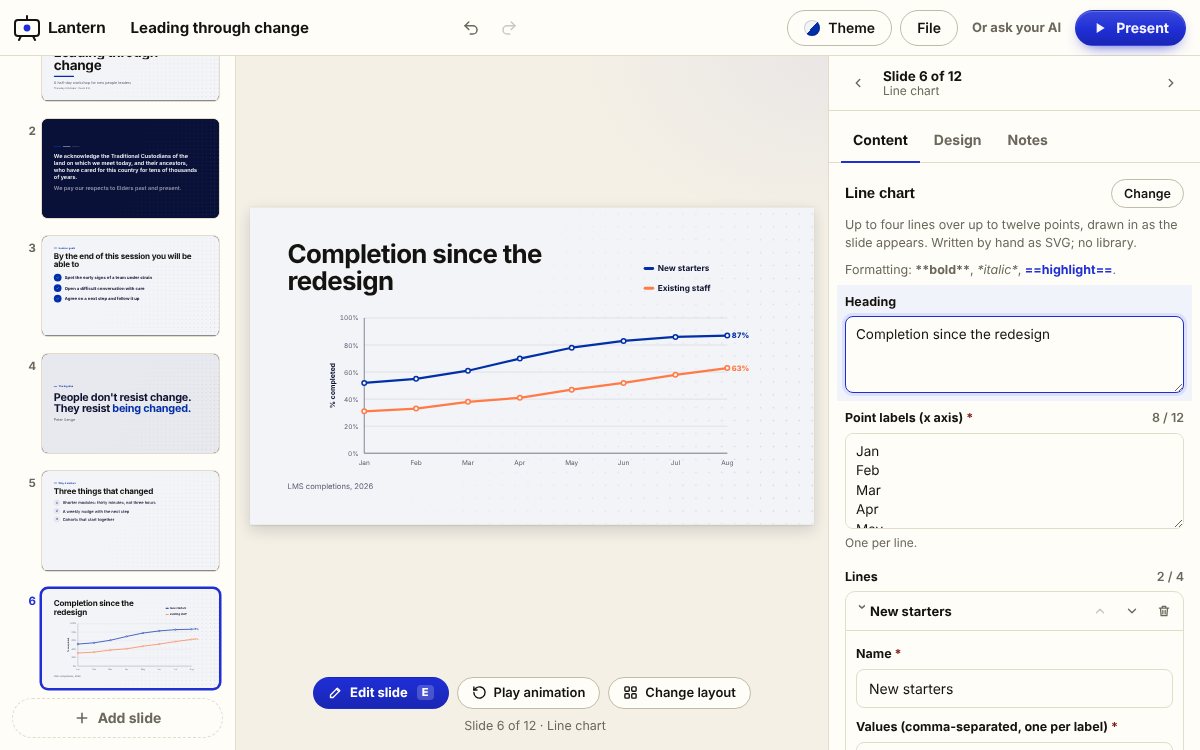
The builder, live, with an example deck loaded
Slides down the left, the current slide in the middle, its fields on the right. Click any text on the slide to edit it, press E, or pick a different layout from the gallery. Theme changes every slide at once. Press P to present. If your browser holds back the download inside the full view, use Open in new tab.
The animation is done for you, so the work is the words
Every layout knows how to arrive: a heading rises, a list builds a line at a time, a bar grows, a number counts up, a timeline draws itself. You never set a build. Twelve themes carry colour, type, corner rounding and a background pattern, and every slide follows the one you pick, with text that stays readable whatever colour you put behind it. The deck presents from a browser with a bar, a slide grid, speaker notes, a black screen and the usual keys, and the same engine runs when your AI builds a deck through the connector.
Slides that do things
An icebreaker spinner that never picks the same person twice, a speaking order you shuffle, a staged timer for a problem clinic, a show of hands you tally, a checklist the room ticks off, a question with the answer held back until you say so.
Knowledge checks that count
A multiple-choice question on a slide, single answer or pick-all-that-apply, with the explanation shown after. The deck totals every check, so a self-paced deck in an LMS reports a score, and flip cards cover the vocabulary on the way.
Other builds, as slides
A Universe, a Long Take, an In-tray or a Quarry you built sits inside a slide, loaded only when its slide is near so a deck with five of them stays light. Any https page that allows embedding works the same way.
Free to build. A plan keeps your work and puts it in the LMS.
Build a whole deck and download it as a single file for nothing; it presents from a desktop, sits in an LMS page, or goes in a folder, and a PDF or PowerPoint comes out of the same menu. A Lazuro Tools plan saves your decks in your library, adds the writing assistant, and packages them with SCORM scoring. It's the same plan, and the same account, as every other Lazuro builder.
Free
Every layout, every theme, present from the browser, and the file. Save the project to edit it again later.
Lazuro Tools · $29 a month
Your decks kept in the library, SCORM packaging with the score reported, and the assistant in every Lazuro builder. Cancel any time.
Lazuro Tools · $290 a year
The same, two months cheaper. Prices in AUD, GST added where it applies; invoices available for organisations.
Want the deck written and designed for you, with your own material? That's a service.
Type the words. The slides do the rest.
A deck that presents itself, with the checks and the icebreakers built in. Free, in the browser, nothing uploaded.
Open Lantern