Replay
Drop in the screenshots of a task, in order. On each one, draw where the learner should click and say what to do. That is the whole build. The learner then does the task on the real screens: a miss shakes the screen, the second miss shows the hint, the third shows them where. A typed step puts an input over the field. At the end they see which steps they got first time, which is the score an LMS records.
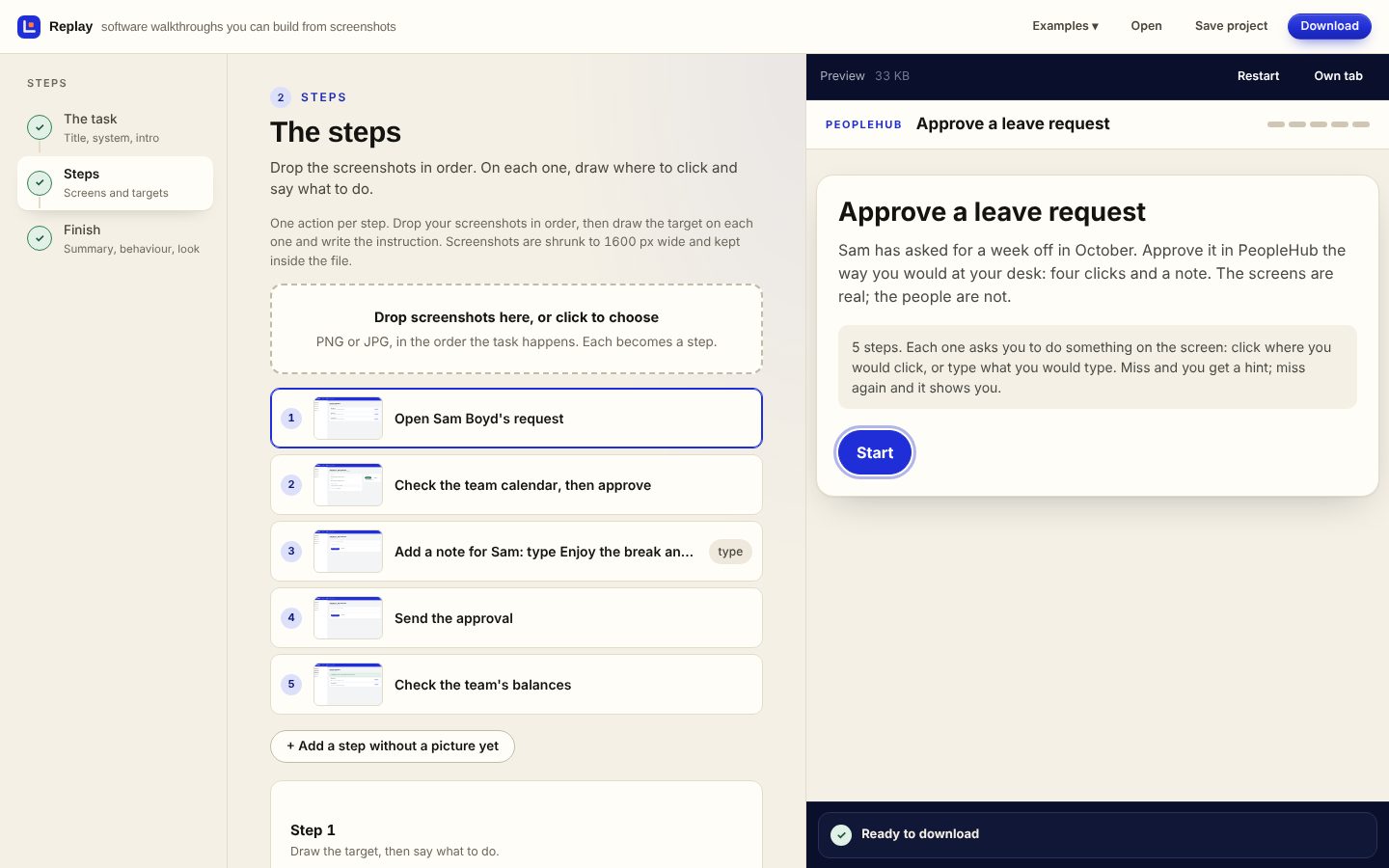
The builder, live, with a five-step walkthrough loaded
Drop screenshots on the second step and they become steps. Drag on the picture to draw the target; the preview on the right is the finished walkthrough, and Preview this step jumps to the one you are editing. If your browser holds back the download inside the full view, use Open in new tab.
Real screens, one action at a time
Screenshots are shrunk to 1600 pixels wide and kept inside the file, so a ten-step walkthrough is usually under two megabytes and works offline, in an LMS, or from a link. Each step has an instruction, an optional note for context, a hint for after the first miss and a line of feedback for the hit. Guided mode teaches; test mode drops the hints and the Show me button and only reveals after the misses you set.
Click or type
Most steps are a click on the right control. A type step puts an input over the field and checks what they enter, loosely or exactly.
Hints, then a reveal
The first miss ripples and shakes; the next shows your hint; after that the target glows and the step counts as shown-where, not first-time.
Scored for the LMS
The page reports the number of steps done first time, so a SCORM package records it, and a hosted link can collect results by name.
Free to build. A plan keeps your work and puts it in the LMS.
Build the whole thing and download it as a single file for nothing; it runs from a desktop, sits in an LMS page, or goes in a folder. A Lazuro Tools plan keeps your work on your account, publishes it as hosted links that can collect learners' results, and packages it with SCORM scoring. It's the same plan, and the same account, as every other Lazuro builder.
Free
Everything the builder does, and the file. Save the project to edit it again later.
Lazuro Tools · $29 a month
Your work kept on your account, hosted links that collect results, SCORM packaging with the score reported, and the assistant in every Lazuro builder. Cancel any time.
Lazuro Tools · $290 a year
The same, two months cheaper. Prices in AUD, GST added where it applies; invoices available for organisations.
Want it written and built for you, with your own material? That's a service.
Screenshots in. A simulation out.
The real task on the real screens, with the hints built in. Free, in the browser, nothing uploaded.
Open Replay